


PPSS22 Emulator - PS2 Emulator
3.5588.00 Reviews
App Specs
- Version
- 415
- Updated On
- License
- Free
- Downloads
- 1,000,000+
- Developer
- Blue Oliver's
- Categories
- Libraries & Demo
- Platform
- Android
Screenshots
 Analysis by AppCompare
If you're anything like me and have a soft spot for the golden era of gaming, then you’ve probably heard whispers about the PPSS22 Emulator. This app aims to bring PS2 gaming to a smartphone, so I looked at what that means in practice: how to approach setup, what to expect from performance, and who is likely to find the compromises worthwhile. An emulator can make old favorites more convenient to revisit, but it is not a guarantee that every game will behave like it did on a console.
What to expect before you start
PPSS22 Emulator is a free Android app from Blue Oliver's, listed in the libraries and demo area. Its audience rating averages 3.4 from around 23,000 ratings, and it has passed the one-million-install mark. It is marked for Everyone, first appeared on July 29, 2023, and its current version is 415, with Android 8.0 as the minimum operating system. Those details give a useful sense of its reach, but they do not tell me whether a particular game will run well on your phone. Emulator performance depends heavily on the device, the game, and the setup.
The practical question is whether you want to experiment with PS2 emulation on a phone, rather than expect a plug-and-play console experience. If you already have a legally obtained game and are comfortable following setup steps, the appeal is clear: a portable way to revisit familiar titles. If you want a polished library of ready-to-play games with no configuration, this is not the same kind of product as a conventional mobile game collection.
First Impressions
Upon installing the PPSS22 Emulator, I was hit with a wave of nostalgia. The interface is pretty straightforward and user-friendly. You don't need to be tech-savvy to navigate through it, which is a huge plus. The app guides you through the setup process, making it easy even for the newbies. Plus, it’s compatible with both Android and iOS, so no one feels left out.
One important point for anyone deciding to download it: the current app details identify Android support, and the minimum requirement is Android 8.0. I would not choose it on the assumption that an iPhone installation is available. Before spending time preparing files or accessories, check that your device meets the Android requirement and that you understand the source and format of the game files you intend to use. That small check can save a frustrating evening later.
Performance, setup, and everyday use
I’d use this section to focus on the practical rhythm of getting started and playing: first confirm that the Android device meets the app’s requirement, then try one game and make changes gradually. That approach makes it easier to tell whether a slowdown comes from a particular title or a setting, and helps keep setup from turning into guesswork.
Performance and Features
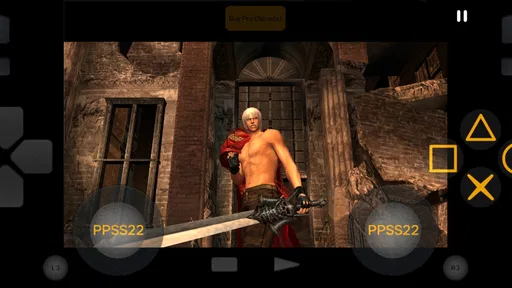
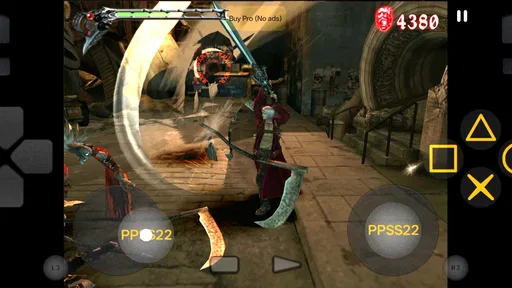
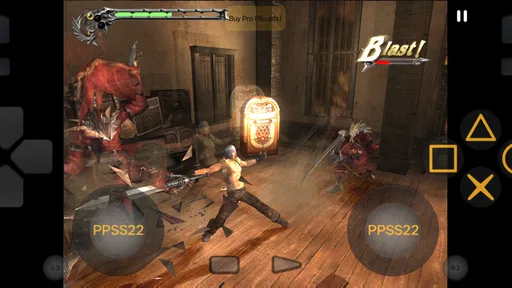
Let's talk about what matters most – performance. The emulator supports a wide range of PS2 games, and I tested it with a couple of my old favorites. I was pleasantly surprised by how smoothly it ran. The graphics rendering is on point, and the audio quality is pretty impressive too. You can customize the controls, which is a godsend for those of us who have our own quirky gaming styles.
Worth Reading Before You Choose

Flipboard Shows What News Apps Must Do Beyond the Feed

Switching to Android Auto Means Rethinking Your Driving Routine

Google Calendar Makes a Crowded Week Easier to Manage

Ludo King Makes the Most of the Minutes Between Plans

Baby Panda World Brings Quick Play to Modern Phones, but Its Game Library Feels Busy

ESPN’s Live Game View Makes Following Close Games Easier
Speed is not something I would judge from a single successful session. A game that feels responsive in a short opening section may behave differently later, especially when the action becomes busier. The most sensible expectation is that results vary: a capable, recent phone is a better starting point than an older budget device, but even good hardware does not promise identical results across a whole library. I would test a game in short sessions before deciding it is a dependable way to play it.
For an everyday use case, imagine having a quiet half-hour on a commute or during a break and wanting to revisit one particular game. This emulator makes most sense when you have already sorted out the setup and know which title you want to play. It is less suitable for a quick spontaneous session if you still need to locate files, learn the controls, or troubleshoot performance. The convenience comes after preparation, rather than replacing it.
Touch controls are a genuine trade-off for this kind of play. They keep the phone self-contained, but buttons drawn over the game can feel less precise than physical controls, particularly when a title expects several quick inputs. The option to customize controls is useful because you can try a layout that suits your hands and the game; I would adjust it before a longer session instead of assuming the default arrangement will work for every genre. An external controller is the better choice if comfort and accurate inputs matter more than travelling light.
One feature I found particularly cool is the save state option. It lets you pick up right where you left off, which is perfect for those times when life rudely interrupts your gaming sessions. There’s also support for external controllers, which is a big win if you're not a fan of touchscreen controls.
Save states are especially handy for short, interrupted play, but I would treat them as a convenience rather than the only way to protect progress. When a game offers its own save system, using that as well is a sensible habit: a quick resume point and an in-game save serve different purposes. For a new title, I would make a test save early and check that resuming works before relying on it for a long stretch of play. That is a small precaution, not a claim that saving will fail.
When a session gets demanding
The situations that expose an emulator are usually not the first few minutes. Longer play can make heat, battery use, and any device slowdown more noticeable, while a demanding scene can reveal stutter that was easy to miss in a quiet area. I would avoid treating a warm phone or an occasional pause as proof that the app is broken; the game and handset both affect the experience. If performance worsens, close other demanding apps, let the device cool, and try a shorter session before changing several settings at once.
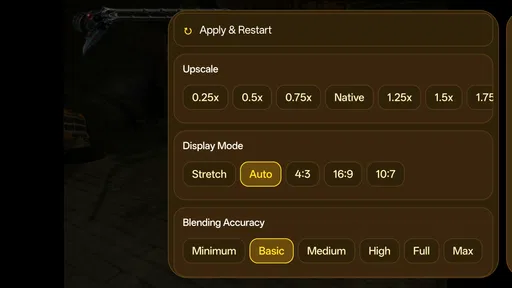
Changing one thing at a time is useful when troubleshooting. If you alter controls, graphics-related options, and other settings together, it becomes difficult to tell which adjustment helped. Start with the default setup, note how the game behaves, then make a single change and compare. This is a more reliable way to find a comfortable balance than chasing the highest possible visual quality or assuming that one setting is best for every title.
Challenges Along the Way
Of course, no app is perfect. While the PPSS22 Emulator does a great job at emulating, it does require a beefy phone to run smoothly. I noticed that older or lower-end devices might struggle a bit. Also, downloading BIOS files can be a bit of a hassle, especially if you're not familiar with it. But hey, nothing worth having comes easy, right?
That setup hurdle is worth taking seriously. An emulator is not the same as a game download service, and having the app alone does not automatically provide a ready-to-play collection. Keep your game and system files tied to sources and uses you are legally entitled to, and be cautious about unfamiliar downloads. If the BIOS step feels confusing or you would rather not manage files, a standard mobile game or an officially available classic collection will be a simpler option.
Device limits are another reason to be selective. If your phone is older, has little free space, or already struggles with demanding apps, I would not make this your first choice for long play sessions. A newer device may offer a more comfortable starting point, but the minimum Android version is only an installation threshold; it is not a promise of strong emulation performance. People who mainly want stable play without experimenting may be happier with a native mobile game, which is designed for the hardware it runs on.
Compared with other options in the same broad area, this app occupies the hands-on emulator side rather than the simple demo or library side. A native game is usually easier to install and control, while a dedicated console offers the familiar original setup but is not as portable. Here, the phone is the convenience, and configuration plus variable performance are the cost. I would choose this app for the chance to explore PS2 titles on Android, not because it removes every practical difference between phone and console.
Who will get the most from it
I think it is best suited to someone who already knows what emulation involves, has a compatible Android phone, and is willing to test settings patiently. It can also suit a curious newcomer who enjoys solving small setup problems and is happy to begin with one game rather than expecting an entire collection to work immediately. An external controller can improve comfort, but it is optional; someone who wants a pocket-only setup can try touch controls and decide whether they are acceptable.
I would steer away if you need guaranteed performance, dislike managing files, or want a game to work instantly without learning any setup steps. It is also not the right fit if you are choosing it for iOS based on the assumption that Android availability means both platforms are covered. A straightforward native game is a better match for quick, predictable play, and a physical console remains the more dependable choice for someone who values the original experience over portability.
Final Thoughts
Overall, the PPSS22 Emulator is a fantastic option for anyone looking to relive the PS2 glory days. It’s like having a mini PS2 console in your pocket. Sure, there might be a few bumps along the way, but once you’ve got it set up, you’re in for a treat. So, if you’re ready to embark on a nostalgic journey, give this emulator a shot. Trust me, your inner child will thank you.
My recommendation comes with a practical caveat: think of it as an experiment you can make convenient, not a promise that every old favorite will run perfectly. Start with a single game, confirm that your files and controls are in order, and see how your phone handles a short session before committing to a longer one. If that process sounds enjoyable, the app’s portability can make revisiting PS2 gaming appealing. If the setup itself sounds like a chore, a native alternative is likely to leave you happier.
Pros
- Smooth gameplay experience on high-end devices.
- Wide range of compatible PS2 games.
- Customizable control settings.
- Supports multiple save states.
- Frequent updates and bug fixes.
Cons
- Requires a powerful device for optimal performance.
- Some games may experience minor glitches.
- Ads can be intrusive in the free version.
- Initial setup can be complex for beginners.
- Occasional audio sync issues.
FAQs for PPSS22 Emulator - PS2 Emulator
What is the PPSS22 Emulator and how does it work?
The PPSS22 Emulator is a software application that allows users to play PlayStation 2 games on their Android or iOS devices. It works by emulating the hardware of the PS2 console, translating game data into a format that mobile devices can process. Users need to download the emulator and compatible game ROMs to start playing.
Is the PPSS22 Emulator legal to use?
Using the PPSS22 Emulator is legal, but downloading copyrighted game ROMs without owning the original game is not. To stay within legal boundaries, users should ensure they own a physical copy of the game they wish to emulate. The emulator itself does not come with any games, maintaining its legality.
What are the system requirements for the PPSS22 Emulator?
The PPSS22 Emulator requires a relatively modern smartphone or tablet with a minimum of 2GB of RAM and a quad-core processor for optimal performance. Additionally, a stable internet connection is recommended for downloading the emulator and any necessary updates. Higher-end devices will provide smoother gameplay and better graphics.
Can I use external controllers with the PPSS22 Emulator?
Yes, the PPSS22 Emulator supports external controllers, enhancing the gaming experience. Most Bluetooth or USB controllers compatible with your device should work with the emulator. Users can customize button mappings within the app settings to suit their preferences, offering a more authentic gaming experience.
How do I improve game performance on the PPSS22 Emulator?
To improve game performance, users can adjust the emulator's settings by lowering the resolution or disabling certain graphical enhancements. Closing background apps and ensuring your device is not in power-saving mode can also help. Regular updates from the developers may provide performance improvements and additional features.


